1 Facebook Business Page
CleanSlate Facebook Page
Set up a clean, professional presence. This is where potential customers check you before texting.
Page Name
CleanSlate
Phone Number
(765) 524-1234
Service Area
New Castle & Henry County, IN
Hours
Mon–Sat 7am–7pm
Page Setup Checklist
- ✓ Profile photo: CleanSlate logo or a photo of the pressure washer in action
- ✓ Cover photo: A before/after — dramatic split showing transformation
- ✓ Bio/tagline: "Pressure washing & junk removal — New Castle, IN. Call or text (765) 524-1234"
- ✓ About section: Driveways, siding, decks, junk cleanouts. Same-week availability.
- ✓ Enable Messages: So people can DM the page directly
- ✓ Pin the best before/after post to the top of the page
2 3-Message Text Autoresponder
Google Voice: (765) 524-1234
Set up Google Voice at voice.google.com. Messages forwarded to your personal phone. The 3-message sequence turns a text into a booked job.
Pro tip
Copy the 3 messages into your phone's keyboard shortcuts or a notes app so you can paste and send in seconds. Speed matters — people lose interest if you take 10 minutes to respond.
3 Before/After Post Template (Canva)
Canva — Before/After Template
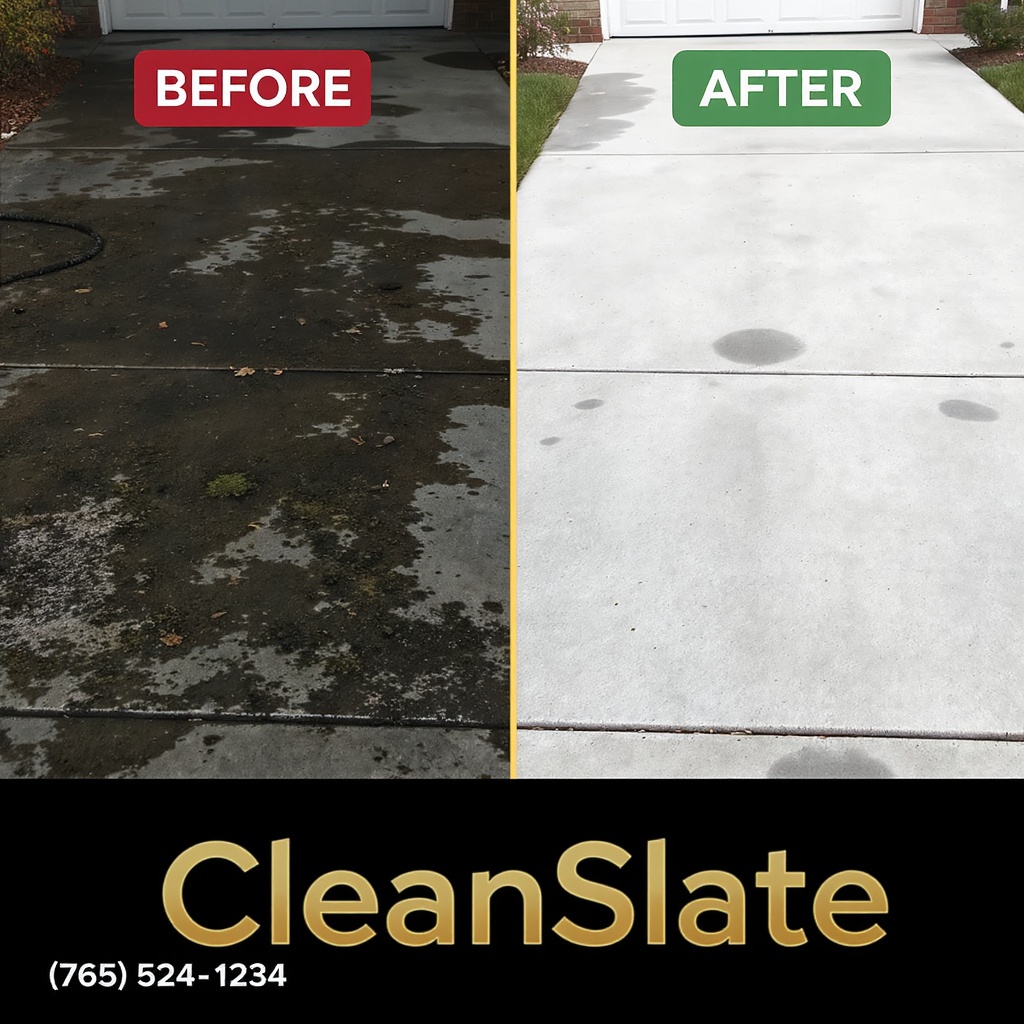
Canva template specs
Canvas size
1080 × 1080 px (square — works everywhere)
Left half
Photo of dirty surface. Label: "BEFORE"
Right half
Same surface, clean. Label: "AFTER"
Watermark
"CleanSlate" — bottom center, gold
Phone number
(765) 524-1234 — bottom left corner
Background
Split-screen overlay: left side slightly darkened, right side bright
How to use
- Open Canva, search "Facebook Post" → choose 1080×1080
- Upload a before photo on the left, an after photo on the right
- Add "BEFORE" label (red background, white text) to left
- Add "AFTER" label (green background, white text) to right
- Add "CleanSlate" watermark bottom center in gold
- Add "(765) 524-1234" in the bottom left corner
- Download as PNG, upload to Facebook
4 Posting Schedule
Before/After Posts
Monday
Before/After photo
Wednesday
Before/After photo
Friday
Before/After photo
3 posts/week
Local Group Posting
Sunday
Local FB group post
1 post/week
Target local groups
- ✓ New Castle, IN community groups
- ✓ Henry County, IN buy/sell/trade groups
- ✓ Neighborhood-specific Facebook groups
- ✓ Local homeowner association groups
The loop, simplified
Photo of messy surface → Photo of clean surface → People see it → They text (765) 524-1234 → We respond in under 2 minutes → We book the job.